
DigitEMB University
Embroidery & machine glossary
Understand the words on your machine, in your software and in your quote. Start with these 36 essentials, then explore the detailed reference when you need more depth.
Explore with pictures
Every essential term now has an illustration. Match the numbered details to the caption, or enlarge a diagram to look more closely. Drawings explain the principles; actual shapes and proportions vary.
36 / 36 terms shown
- Machine & setupNeedle
1 Needle; 2 upper thread; 3 fabric. The eye is near the point, so the needle carries thread through the fabric. - The part that carries the upper thread through the fabric. Choose the needle system, point and size specified for your machine and material.
- Machine & setupBobbin
1 Bobbin; 2 lower thread; 3 fabric above. The bobbin supplies thread from below the work. - The small spool that supplies the lower thread. Its size, winding and thread must match the machine's requirements.
- Machine & setupRotary hook
1 Hook tip; 2 upper-thread loop; 3 bobbin. The hook carries the loop around the bobbin assembly to form a lockstitch. Simplified view. - The mechanism that catches the upper-thread loop to form a stitch with the bobbin thread. Cleaning and lubrication are model-specific.
- Machine & setupThread tension
1 Upper thread; 2 bobbin thread; 3 interlocking threads. This enlarged cross-section shows how both threads meet within the fabric; it is not a tension-setting guide. - The resistance applied to thread as it feeds. Poor stitch balance can also come from threading, needles or fabric support; tension is only one factor.
- Machine & setupHoop / frame
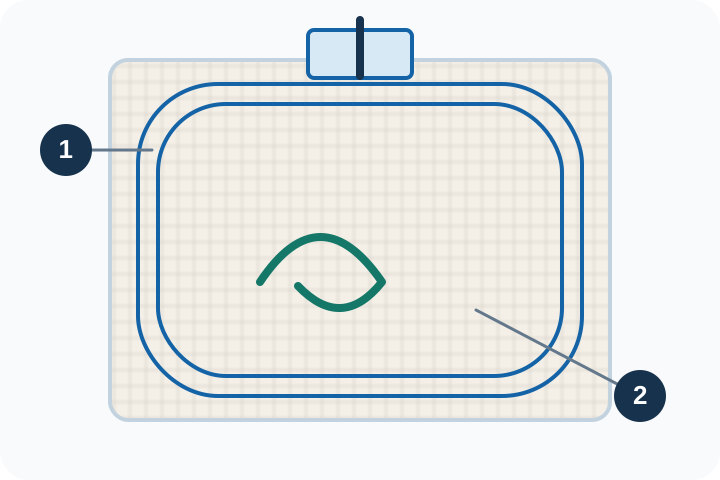
1 Hoop frame; 2 fabric held inside it. The frame holds the fabric and stabilizer while the machine moves the work under the needle. - The holder that keeps fabric and stabilizer positioned during embroidery. The usable sewing area is smaller than its outside dimensions.
- Machine & setupEmbroidery field
1 Hoop; 2 usable embroidery field. The dashed area is smaller than the hoop opening: a design must fit the machine’s permitted stitching area. - The area a particular machine and frame combination can stitch. Confirm the actual field before sizing or positioning a design.
- Machine & setupStitches per minute (SPM)
1 One minute; 2 stitches made during that time. This measures sewing speed; thread changes, trims and stops add to total production time. - A measure of machine sewing speed. Actual job time also includes stops, trims, color changes, hooping and finishing.
- Machine & setupThread break
1 A break in the upper thread between spool and needle. The gap stops continuous stitching and must be resolved before sewing continues. - An interruption caused by a broken thread. Check the thread path, needle, material and design; one symptom can have several causes.
- Thread & stabilizersStabilizer / backing
1 Fabric; 2 backing underneath. This separated view shows the support layer that helps resist fabric movement during stitching. - Material placed behind the fabric to support embroidery. Choose it for the fabric, design and intended use of the finished item.
- Thread & stabilizersCutaway stabilizer
Back view: 1 excess backing is cut away; 2 backing beneath the stitches stays in place to support the finished embroidery. - Backing whose excess is cut away after stitching. The part beneath the design stays in place to provide continuing support.
- Thread & stabilizersTearaway stabilizer
Back view: 1 embroidered fabric; 2 excess backing being torn away. The stitches hold the design while the surrounding backing is removed. - Backing designed so excess can be torn away after stitching. Remove it carefully while supporting the stitches and fabric.
- Thread & stabilizersTopping
1 Topping above; 2 textured fabric; 3 backing below. A topping helps keep stitches from sinking into the fabric’s surface texture. - Material placed on top of textured fabric to help keep stitches from sinking into the surface. Follow its removal and fabric-care instructions.
- Thread & stabilizersThread weight
1 Example of 40-weight thread; 2 finer 60-weight thread. Within the same weight system, a higher number usually means a finer thread; the drawing exaggerates the difference. - A thread-size designation. Numbering systems differ, so compare manufacturer specifications instead of assuming that equal numbers mean equal thickness.
- Stitches & digitizingUnderlay
1 Foundation stitches shown exposed; 2 cover stitches on top. Underlay is sewn first and is usually hidden by the finished embroidery. - Foundation stitches sewn before the visible top stitches. They help support the fabric and give the top stitching a more stable base.
- Stitches & digitizingStitch density
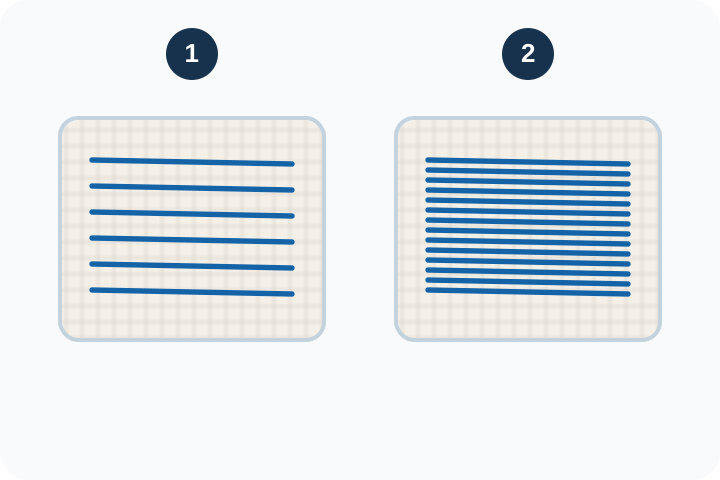
1 Wider spacing, fewer stitch rows; 2 closer spacing, more rows in the same area. More density does not automatically produce better embroidery. - How closely stitches are packed. Software often expresses it as spacing: a smaller spacing value usually means denser stitching. Test on the intended fabric.
- Stitches & digitizingPull compensation
1 Digitized width extends beyond the dashed target; 2 stitching pulls toward the intended width. The amount depends on the fabric, thread and stitch direction; this is a conceptual example. - A digitizing adjustment that extends stitch coverage to counter fabric pulling inward. The right amount depends on the fabric, stitch structure and test sew-out.
- Stitches & digitizingRunning stitch
1 Short stitches follow a path; 2 dots mark needle penetrations. The connected segments form a line rather than covering a wide area. - A sequence of individual stitches along a path. It is used for lines, details and some hidden travel or foundation stitching.
- Stitches & digitizingSatin stitch
1 One edge; 2 opposite edge. Closely spaced stitches span the full column width, creating a smooth band for suitable lettering and borders. - Stitches spanning across a narrow shape to create a smooth, lustrous surface. Very long spans may need splitting or a different stitch type.
- Stitches & digitizingFill stitch / tatami
1 Rows cover a broad area; 2 staggered needle penetrations divide the rows into shorter stitches. This is a simplified tatami-style fill. - Rows of stitches arranged to cover an area. Stitch angle, spacing and pattern affect its appearance and how the fabric behaves.
- Stitches & digitizingTrim
1 The connecting thread is cut between separated stitched areas. Cutting removes a connector that would otherwise cross the fabric. - A thread-cutting action between parts of a design. Machine support and file interpretation vary; inspect both the file and a real sew-out.
- Stitches & digitizingJump stitch
1 The thread crosses an unstitched gap between two areas. The machine moves without needle penetrations along that gap; the thread may need trimming. - A move between stitching locations without forming normal stitches along the route. It can leave a connecting thread that needs trimming.
- Quality & approvalRegistration
1 Offset outline leaves a gap on one side; 2 aligned outline meets the fill. Compare outlines and color areas during a sew-out. - How well parts of a design line up, such as an outline around a fill. Fabric movement, sequencing and digitizing choices can affect it.
- Quality & approvalSew-out
1 Stitch file; 2 physical stitched sample. Sewing on the intended fabric and backing reveals behavior that a screen preview cannot confirm. - A physical embroidery sample made from the stitch file. It reveals behavior that a screen preview cannot confirm, including texture, puckering and material interaction.
- Quality & approvalProof
1 Digital preview; 2 approval check. A proof helps confirm appearance and placement, but it does not replace a physical sew-out. - A version supplied for approval of details such as size, spelling, placement and colors. Confirm whether it is a digital preview or a physical sample.
- Software & filesEmbroidery digitizing
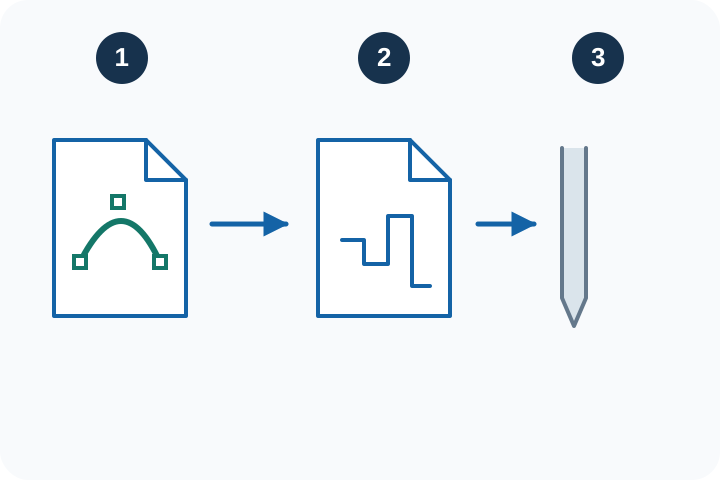
1 Artwork; 2 planned stitches; 3 needle execution. Digitizing turns shapes into a stitch sequence with chosen stitch types, paths and settings. - Planning and creating stitch instructions from artwork. It includes stitch types, order, underlay and material-specific settings; changing a filename does not perform digitizing.
- Software & filesNative design file
1 Editable shape nodes; 2 design properties. A native source file preserves editing information that an exported machine file may not contain. - The software's editable working format, which may preserve objects and settings. Keep it alongside the exported machine file for future revisions.
- Software & filesMachine stitch file
1 Stitch instructions; 2 embroidery machine. Export a supported format, then check design size, orientation and machine limits before stitching. - An exported file containing embroidery instructions for compatible machines. Confirm format, design size and machine limits before use.
- Software & filesDST
1 A .DST stitch file; 2 a compatible machine. The extension identifies a stitch format, not a guarantee of size, thread-color data or suitability for every machine. - A widely used embroidery stitch-file format. It does not reliably communicate your intended thread shades, so supply a separate color sequence or worksheet.
- Software & filesPES
1 A .PES embroidery file; 2 a compatible machine. Check the PES version and design size supported by the particular machine model. - An embroidery format supported by certain Brother, Baby Lock and other compatible systems. Check your exact model and supported file version.
- Artwork & productsVector artwork
1 Anchor point on a curve; 2 control handle shaping the curve. Vector paths describe shapes mathematically; they are not embroidery stitches by themselves. - Artwork described by paths and shapes instead of pixels. It can be resized cleanly, but still needs digitizing before it becomes machine embroidery.
- Artwork & productsAppliqué
1 Base fabric; 2 separate fabric shape; 3 securing stitches around its edge. Appliqué combines fabric pieces with embroidery. - A method that attaches a separate piece of fabric to a base material with stitching. Placement, tack-down and finishing stages need accurate alignment.
- Artwork & productsMerrowed border
1 Looped overedge stitching; 2 patch body. A Merrow-style border wraps thread around the patch edge instead of leaving a raw cut edge. - A wrapped, overlocked edge commonly used on patches. Its suitability depends on the patch shape, thickness and intended finish.
- Artwork & productsPrint bleed
1 Artwork extends beyond the cut; 2 dashed trim line. The extra printed area helps avoid an unprinted sliver if cutting shifts slightly. - Artwork extended beyond the final cut line so small cutting variations do not expose an unprinted edge. Follow the printer's required allowance.
- Pricing & businessSetup cost
1 One setup cost of 30; 2 a batch of 10 items shares it at 3 per item. The illustration shows three sample items; these are example amounts, not DigitEMB prices. - Work needed before a production run, such as digitizing, sampling or machine preparation. Decide whether it is charged separately or allocated across units.
- Pricing & businessMargin
Example: selling price 20, 1 cost 12, 2 gross profit 8. Margin divides profit by selling price: 8 ÷ 20 = 40%. Other business expenses can reduce net profit. - Profit expressed as a share of the selling price: (price minus cost) ÷ price. Define which costs you include before comparing margins.
- Pricing & businessMarkup
Same example: selling price 20, 1 cost 12, 2 gross profit 8. Markup divides profit by cost: 8 ÷ 12 ≈ 66.7%. It differs from the 40% margin on the same sale. - The amount added to cost, expressed as a share of cost: (price minus cost) ÷ cost. A 50% markup is not a 50% margin.
Go deeper: 285-term reference
Our detailed English glossary includes technical notes, examples and related terms. This essential glossary is available in six languages; the full reference and most linked lessons are currently in English.
Open the full English glossaryTurn knowledge into better work
Before quoting a job, record the finished size, material, quantity, placement and approval requirements. Make a sample, time the real process and use those results to price the work.
Pricing example
Illustration only: if the costs included in your estimate total 10 and you sell for 15, profit before any excluded costs is 5. Markup is 50%; margin is 33.3%. Add labor, setup, materials, overhead and expected rework before deciding whether a price works for your business. This is not an earnings forecast.
Keep learning
Technical references
Use the manual for your exact machine and software version. Operating limits, needles, cleaning and lubrication are model-specific. The references below are in English; a glossary is not a machine operating manual.
- Wilcom — underlay and pull compensation
- Brother — supported embroidery formats
- Madeira — stabilizer selector
- Tajima — machine basics manual (PDF)
Content updated: